リバースエンジニアリング専門のCTF Flare-On Challenge。今年で13回目の開催で、自分は7回目の参戦である。
今年は3問目でリタイア(2問目に時間をかけ過ぎてしまった)。
1~2問目の解法及び3問目の経過をまとめておく。
主催者公式のwriteupはこちら。
01 FLAreCAPTCHA
1問目は1~2時間くらいで解けた。
以下は解析対象のファイル。
$ 7z l 1-flarecaptcha.7z

   Date      Time    Attr         Size   Compressed  Name
------------------- ----- ------------ ------------  ------------------------
2026-06-06 01:20:33 ....A        16048         4160  flarecaptcha.html
------------------- ----- ------------ ------------  ------------------------
2026-06-06 01:20:33 16048 4160 1 filesflarecaptcha.htmlをブラウザで開くと、reCAPTCHAを模倣したページが現れた。しかし、普通にチェックボックスをクリックしても、Robot, or unskilled reverse engineer detected.というメッセージが表示されるだけで何も起きない。
flarecaptcha.htmlを眺めたところ、フラグの復号処理が2段階に分けられていることが判明した。
以下は1段階目の復号処理のコードである。
        const recaptchaLogoBitmap = [123, 5, 102, 4, 100, 22, 102, 19, 106, 28, 110, 7, 103, 24, 109, 30, 110, 55, 105, 27, 110, 5, 106, 90, 96, 25, 33, 20, 96, 26];

        // Setup proxy for logo data to disallow direct string access
        const recaptchaLogoBitmapProx = new Proxy(recaptchaLogoBitmap, {
            get(target, prop) {
                if (typeof prop === 'string' && !isNaN(prop)) {
                    const envShift = document.characterSet.length;
                    return target[prop] ^ envShift;
                }
                return target[prop];
            }
});上記のコードは変数recaptchaLogoBitmapと変数envShiftのXORを取る。envShiftにはドキュメントの文字エンコーディング名の文字数が代入される。文字エンコーディング名はflarecaptcha.htmlの冒頭にて定義されている。
<meta charset="UTF-8">文字エンコーディング名はUTF-8 (5文字) なので、envShiftには5が代入される。
以下はrecaptchaLogoBitmapとenvShift (5) のXORを取るPythonスクリプトである。
recaptchaLogoBitmap = [123, 5, 102, 4, 100, 22, 102, 19, 106, 28, 110, 7, 103, 24, 109, 30, 110, 55, 105, 27, 110, 5, 106, 90, 96, 25, 33, 20, 96, 26]
myarray = []

for i in range(len(recaptchaLogoBitmap)):
    #print(recaptchaLogoBitmap[i])
    myarray.append(recaptchaLogoBitmap[i] ^ 5)
print(myarray)
以下はスクリプトの実行結果。
$ python3 solver.py
[126, 0, 99, 1, 97, 19, 99, 22, 111, 25, 107, 2, 98, 29, 104, 27, 107, 50, 108, 30, 107, 0, 111, 95, 101, 28, 36, 17, 101, 31]
フラグを取得するには上記の値を更にビット演算する必要がある。
以下は2段階目の復号処理のコードである。
// set left and right layout limits
const wupperLeft = (widgetUpperBoundsPx >> 8) & 0xFF;
const wupperRight = widgetUpperBoundsPx & 0xFF;

// Generate surface map from logo map and string length
const displaySurfaceMap = recaptchaLogoBitmapProx.map((b, i) => String.fromCharCode(b ^ (i % 2 === 0 ? wupperLeft : wupperRight))).join('');
上記のコードは1段階目の復号処理で求まった値 (配列) を1バイトずつXORするのだが、配列のインデックスが偶数の場合は変数wupperLeftと、奇数の場合は変数wupperRightとXORを取る。
- 0, 2, 4... バイト目 ^
wupperLeft - 1, 3, 5... バイト目 ^
wupperRight
wupperLeftとwupperRightの値は現在時刻 (Date.now()) をもとに動的に生成される。
            // Ensure click occured in captcha box with 5,0 and 1,1 layout grids
            if (e.button === (Math.pow(5, 0) + Math.pow(1, 1))) {
                isVerifying = true;
                errorLogStartTime = Date.now();
                checkbox.className = 'rc-anchor-checkbox verifying';
                checkbox.innerHTML = '<div class="rc-spinner"></div>';

                // Requirement: Only detect as human if left click occurred more than X time after page load
                rightClickHoldTimer = setTimeout(() => {
                    isVerifying = false;
                    isVerified = true;

                    const errorLogTime = Date.now()

                    // Set log granularity to 1 second resolution
                    const displayPaddingPx = Math.round((errorLogTime - errorLogStartTime) / 1000);

                    const widgetLength = resetWidget.toString().length;

                    // Bound the display box to a visually appealing ratio based on the classic Harbour's formula
                    const widgetUpperBoundsPx = (displayPaddingPx * (widgetLength + 1115)) & 0xFFFF;

                    // set left and right layout limits
                    const wupperLeft = (widgetUpperBoundsPx >> 8) & 0xFF;
const wupperRight = widgetUpperBoundsPx & 0xFF;しかし、本チャレンジではフラグの末尾13文字が@flare-on.comであることが、あらかじめ判明しているので、Known-plaintext攻撃の要領でXOR鍵を推測することができる。
以下は暗号データと平文の対応表。
| 暗号データ | 平文 | (0から数えて) 何バイト目? |
| 50 | @ | 17 (奇数) |
| 108 | f | 18 (偶数) |
| 30 | l | 19 (奇数) |
| 107 | a | 20 (偶数) |
| 0 | r | 21 (奇数) |
| 111 | e | 22 (偶数) |
| 95 | - | 23 (奇数) |
| 101 | o | 24 (偶数) |
| 28 | n | 25 (奇数) |
| 36 | . | 26 (偶数) |
| 17 | c | 27 (奇数) |
| 101 | o | 28 (偶数) |
| 31 | m | 29 (奇数) |
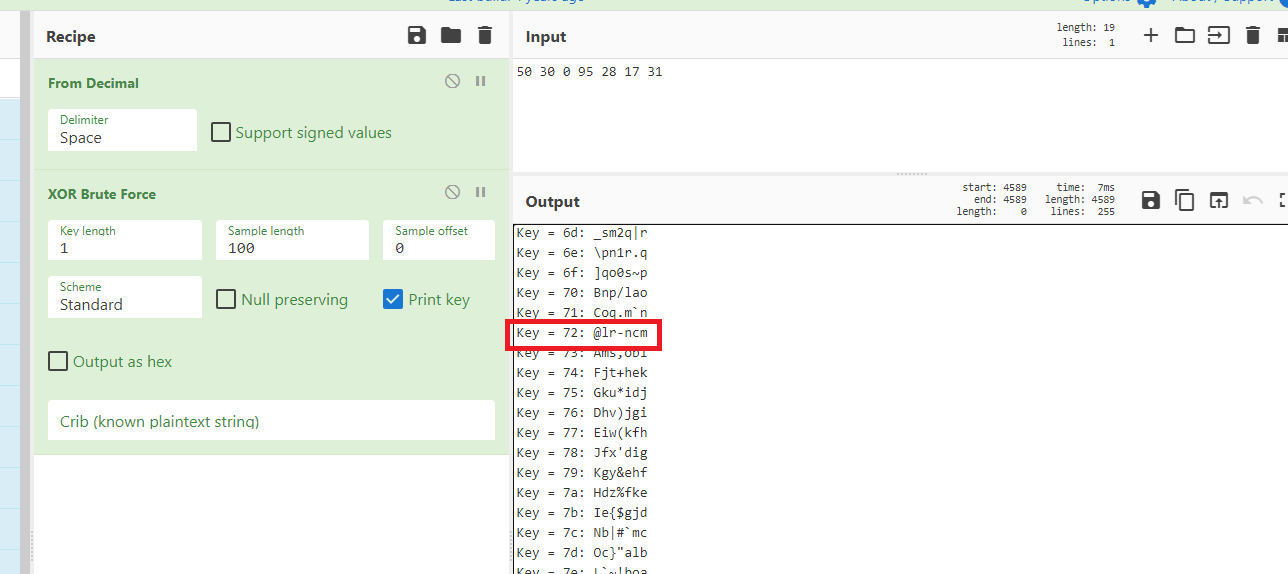
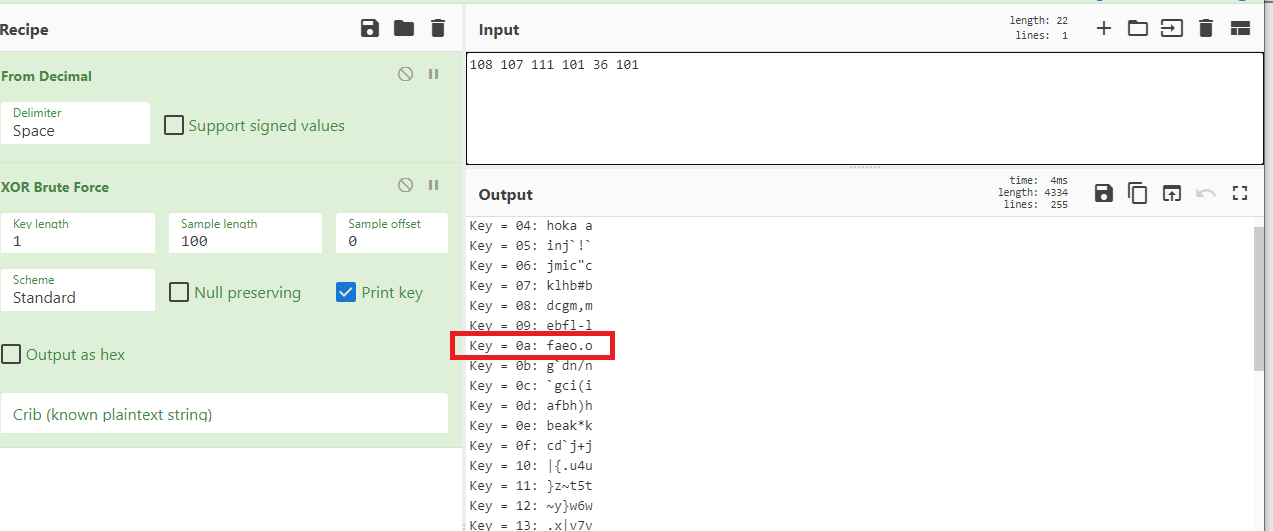
CyberChefでXORブルートフォースした結果、奇数時のXOR鍵は0x72、偶数時のXOR鍵は0x0aと判明した。
以下のPythonスクリプトでフラグを取れた。
enc_flag = [126, 0, 99, 1, 97, 19, 99, 22, 111, 25, 107, 2, 98, 29, 104, 27, 107, 50, 108, 30, 107, 0, 111, 95, 101, 28, 36, 17, 101, 31]
flag = ''

for i in range(len(enc_flag)):
    if (i % 2 == 0):
        flag += chr(enc_flag[i] ^ 0x0a)
    else:
        flag += chr(enc_flag[i] ^ 0x72)
print(flag)
$ python3 solver02.py
triskaidekaphobia@flare-on.comフラグはtriskaidekaphobia@flare-on.com。
02 GhostStream
今回、ほとんどの時間を2問目に費やしてしまった。解けた頃にはCTF終了まで2日半という有様だった。
以下は解析対象のファイル。
$ 7z l 2-GhostStream.7z

   Date      Time    Attr         Size   Compressed  Name
------------------- ----- ------------ ------------  ------------------------
2026-07-28 20:35:42 ....A        37428        12464  GhostStream.wim
------------------- ----- ------------ ------------  ------------------------
2026-07-28 20:35:42 37428 12464 1 filesGhostStream.wimの中にはGhostStream.exeとPolyjuicePotion.txtというファイルが含まれていた。
$ 7z l GhostStream.wim

   Date      Time    Attr         Size   Compressed  Name
------------------- ----- ------------ ------------  ------------------------
2026-07-28 22:34:55 D....                            GhostStream
2026-07-28 16:22:24 ....A        35328        35328  GhostStream/GhostStream.exe
2026-07-12 17:23:32 ....A          316          316  GhostStream/PolyjuicePotion.txt
------------------- ----- ------------ ------------  ------------------------
2026-07-28 22:34:55              35644        35644  2 files, 1 folders
2026-07-12 17:23:32                 18           18  1 alternate streams
2026-07-28 22:34:55 35662 35662 3 streamsまた、上記の7zコマンドのアウトプットでも示唆されているが、PolyjuicePotion.txtにはAlternate Data Stream (ADS) が付与されていた。
C:\Users\analyst\Desktop\2-GhostStream\GhostStream\GhostStream>dir /r
 Volume in drive C has no label.
 Volume Serial Number is A02F-C57A

 Directory of C:\Users\analyst\Desktop\2-GhostStream\GhostStream\GhostStream

10/24/2026  12:33 AM    <DIR>          .
10/24/2026  12:33 AM    <DIR>          ..
10/17/2026  08:08 PM            35,328 GhostStream.exe
07/12/2026  02:23 AM               316 PolyjuicePotion.txt
                                    18 PolyjuicePotion.txt:LordVoldemort:$DATA
               2 File(s)         35,644 bytes
2 Dir(s) 16,727,818,240 bytes freeADSの中にAlbusDumbledoreという文字列を発見。
C:\Users\analyst\Desktop\2-GhostStream\GhostStream\GhostStream>more < PolyjuicePotion.txt:LordVoldemort:$DATA
AlbusDumbledore
GhostStream.exeをCFF Explorerで眺めたところ、リソースセクションに不審なPEペイロードを発見。
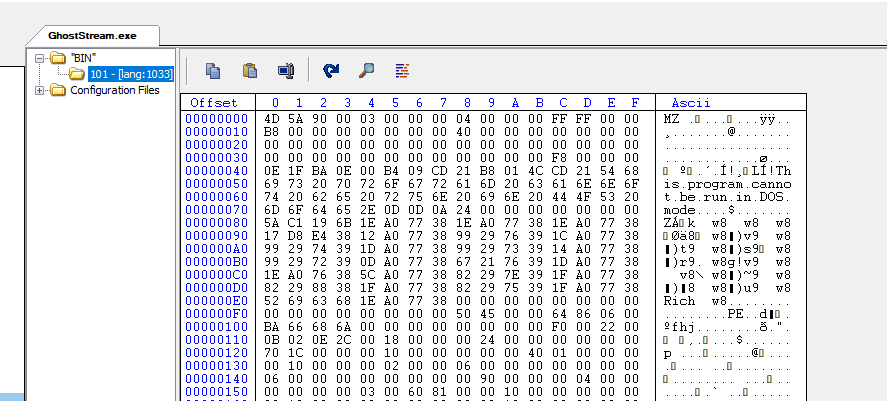
GhostStream.exeが実行されると、このPEペイロードが抽出されて、Partner_CTF.exeとして一時ディレクトリに保存される。
Partner_CTF.exeを抽出して眺めたところ、どうもこのファイルがフラグの復号を行うようだったので、最初はPartner_CTF.exeだけを解析していた。復号の鍵はAlbusDumbledoreと決めつけていたので、復号処理の内容さえわかればフラグを取れると思っていたのだ。
で、ある程度Partner_CTF.exeの復号処理の内容が判明したのだが、どうも復号鍵はAlbusDumbledoreをそのまま使っているわけではないようだった。GhostStream.exeの解析に着手したことで、ようやく正しい復号鍵を得ることができた。
なので、実際の解析はPartner_CTF.exe → GhostStream.exe の順番で行ったのだが、分かりやすさを考慮してGhostStream.exe → Partner_CTF.exe の順番で解説する。
まずはGhostStream.exeとPartner_CTF.exeの概要を説明して、それぞれのファイルの解析を載せる。
ちなみにどちらのファイルもアンチデバッグが盛り込まれていたが、自分のx64dbgデバッガはScyllaHideがインストールされていたので、ある程度アンチデバッグを回避できた。
また、どちらのファイルもASLR が有効化されているので、デバッグの際には無効化しておく必要がある。
GhostStream.exeの概要
PolyjuicePotion.txtのADS (PolyjuicePotion.txt:LordVoldemort:$DATA) を読み込む。- 読み込んだADS (
AlbusDumbledore) に対してさらなるビット演算処理を施し、ADSの値を変化させる。 - 名前付きパイプ (
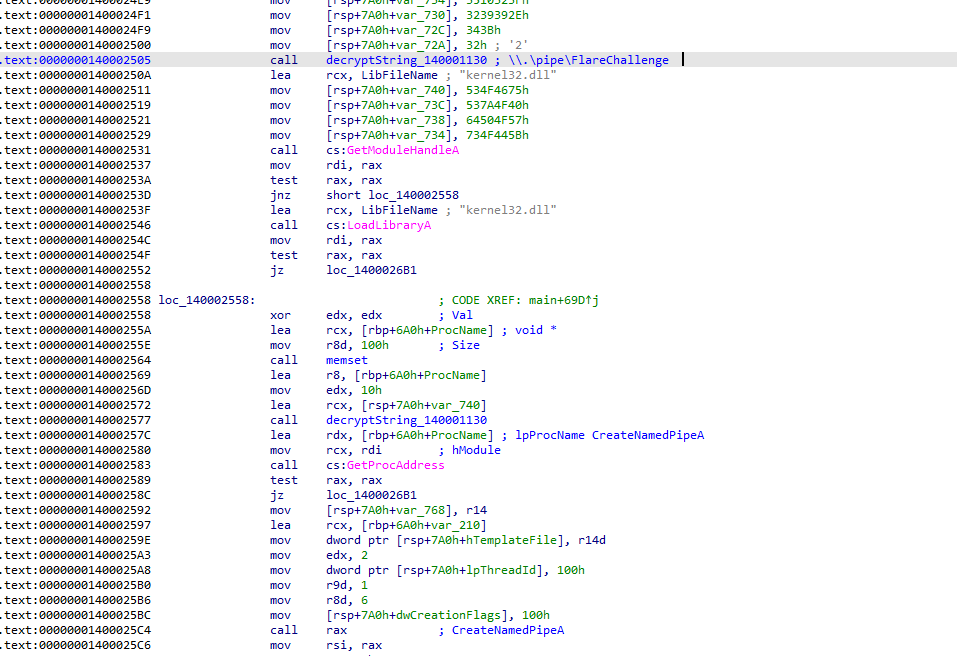
\.\pipe\FlareChallenge) を作成する。 - リソースセクションからPEファイルを抽出して、
Partner_CTF.exeとして一時ディレクトリに保存し、実行する。 - ADSの値を名前付きパイプ に書き込む。
Partner_CTF.exeの概要
- 名前付きパイプ (
\.\pipe\FlareChallenge)に書き込まれた値を鍵にしてRC4のS-boxを生成する。 - 生成されたS-boxをもとにカスタムの復号処理を用いてハードコードされたフラグを復号する。
GhostStream.exeの解析
GhostStream.exeにはアンチデバッグがいくつか盛り込まれており、その一つがAPI名の難読化である。GhostStream.exeはCreateNamedPipeAやConnectNamedPipeなどのAPIを呼び出すのだが、これらのAPI名は難読化が施されており、stringsなどの単純なチェックでは検知できない。
難読化されたAPI名の復号はサブルーチン 0x140001130によって行われる。
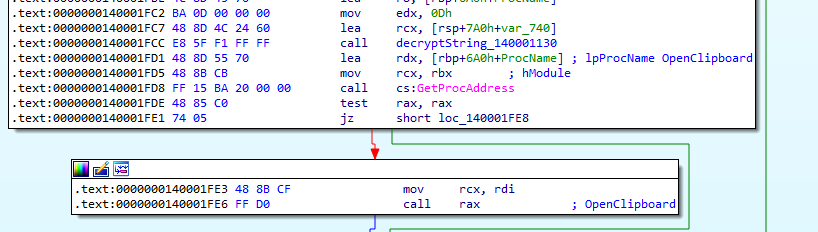
上記はサブルーチン 0x140001130によってOpenClipboard というAPI名を復号し、GetProcAddressでAPIのアドレスを取得してcall rax でOpenClipboard を呼び出す (これが実行されるとクリップボードがジャックされてコピペができなくなるので、解析の際はNOPした)。
サブルーチン 0x140001130はプログラムの中で複数回呼び出され、上記と同様の手法でAPIを復号・実行する。
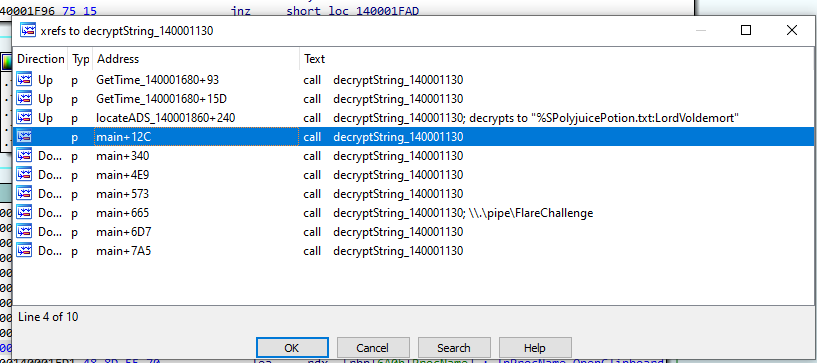
サブルーチン 0x140001130によって復号される文字列を確認するにはサブルーチン 0x140001130のcall直後にブレークポイントをセットして、メモリの中身をダンプすれば良い。
サブルーチン 0x140001130が復号するAPIは以下の通り。
OpenClipboardGetProcessTimesGetSystemTimeAsFileTimeNtSetInformationThreadRegisterClassExACreateWindowExaCreateNamedPipeAConnectNamedPipe
API以外に、以下の文字列を復号する。
%SPolyjuicePotion.txt:LordVoldemort\.\pipe\FlareChallenge
GhostStream.exeは、実行されると新しいスレッドを作成して、サブルーチン0x140001CA0を実行した後、10秒間スリープする。
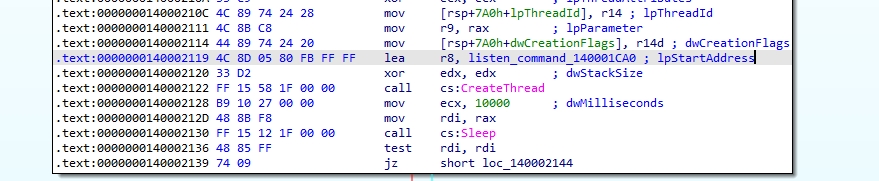
サブルーチン0x140001CA0が実行されると31337番ポートが待ち受け状態に入る。もしこのポート宛にOVERRIDE:で始まるペイロードが送られた場合、OVERRIDE:に続くデータを復号する ([data] ^ 0x33 + 0x05)。
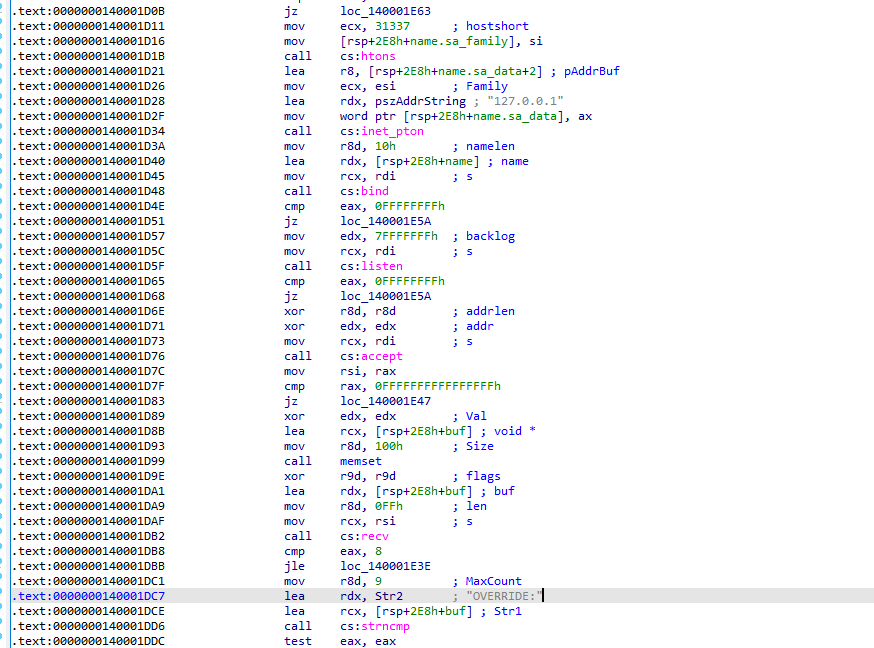

このネットワーク通信の用途は不明 (31337番ポートに通信を送らなくても解析には差し支えなかった)。
スリープ後、新たにスレッドが作成されて、サブルーチン 0x140001860が実行される。

このサブルーチンは内部で先述した文字列を復号するサブルーチンを呼び出し、PolyjuicePotion.txt:LordVoldemortという文字列を復号する。
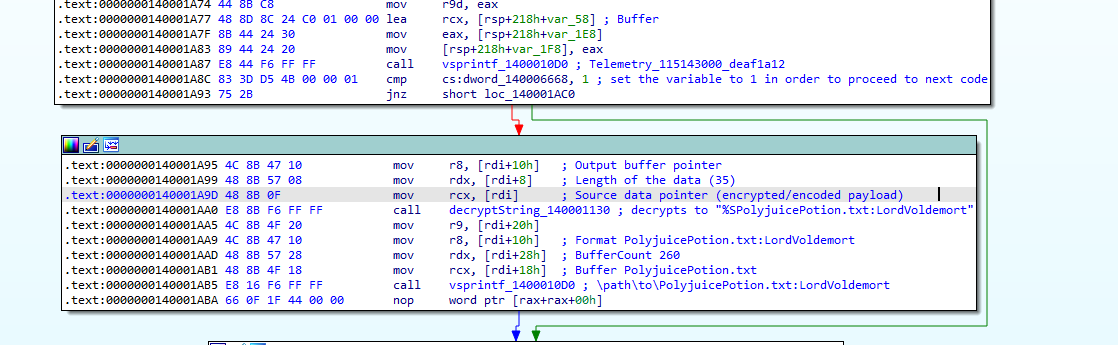
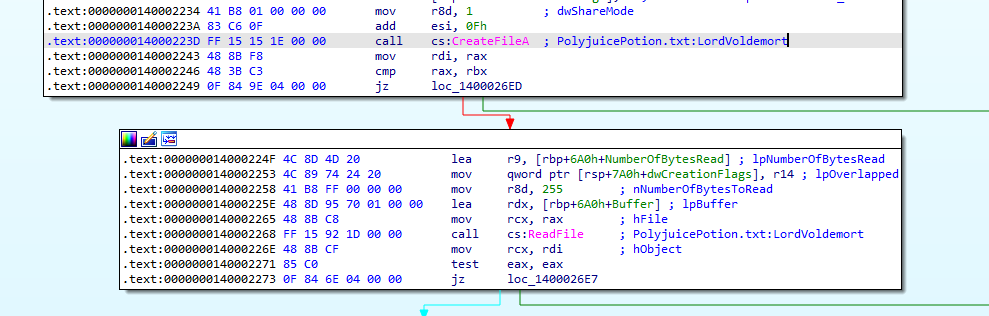
PolyjuicePotion.txt:LordVoldemortがCreateFileAに渡され、ReadFileでADSの中身 (AlbusDumbledore) が読み込まれる。
当初はAlbusDumbledoreがフラグ復号のための鍵だと決めつけていたのだが、解析を続けるうちに、もう少しひねってあることに気づき、コードを精査した。で、サブルーチン0x140001B20にてADSのデータを変化させていることが分かった。

サブルーチン0x140001B20はどうやらADSのデータ (AlbusDumbledore) に対してXOR演算を複数回行うようなのだが、処理が少々複雑だったので、AIの力を借りつつ解析した。正直、完全に理解したわけではないのだが、概ね以下の処理を行う模様。
まず、引数として渡されたウィンドウメッセージが0x81 (WM_NCCREATE) と等しいか確認し、真の場合はSetWindowLongPtrWを呼び出した後、戻り値として1を返し、偽の場合はADSのデータに対してXOR演算を行う。
XOR演算は2段階に分かれており、1段階目ではADSのデータと、現在のウィンドウメッセージの値と、前回のウィンドウメッセージの値のXORを取る。
xored_ads[i] = ads[i] ^ [value of current window message] ^ [value of previous window message]2段階目では、1段階目で求まった値と、ハードコードされた値 (0x8b, 0x8f, 0x92, 0x85, 0x88, 0x96, 0x98, 0x9b, 0x94, 0x8b, 0x95, 0xe6, 0xed, 0xf0, 0xe7) のXORを取る。
ついでにAIにスクリプトも生成してもらった。
def apply_static_xor_patch(data: bytearray) -> bytearray:
    """Applies the 15-byte static XOR mask found at the end of both branches."""
    static_keys = [
        0x8b, 0x8f, 0x92, 0x85, 0x88,
        0x96, 0x98, 0x9b, 0x94, 0x8b,
        0x95, 0xe6, 0xed, 0xf0, 0xe7
    ]

    result = bytearray(data)
    for i in range(min(len(result), len(static_keys))):
        result[i] ^= static_keys[i]
    return result

def decrypt_dynamic_loop(data: bytearray, param_2: int, b_var1: int) -> bytearray:
    """
    Emulates the dynamic byte-by-byte XOR loop executed when
    ppbVar3[2] > ppbVar3[3].
    """
    result = bytearray(data)
    # Replicate the loop: pbVar6[uVar9] = pbVar6[uVar9] ^ (byte)param_2 ^ bVar1
    for i in range(len(result)):
        result[i] ^= (param_2 ^ b_var1) & 0xFF

    return apply_static_xor_patch(result)

def decrypt_direct_patch(data: bytearray) -> bytearray:
    """
    Emulates the direct path executed when
    ppbVar3[2] <= ppbVar3[3].
    """
    return apply_static_xor_patch(data)

# --- Example Usage ---
if __name__ == "__main__":
    # Example obfuscated byte array (mock data representing the buffer)
    # Replace this with the actual raw bytes extracted from memory or the binary.
    obfuscated_bytes = bytearray([
        0x41, 0x6c, 0x62, 0x75, 0x73, 0x44, 0x75, 0x6d, 0x62, 0x6c, 0x65, 0x64, 0x6f, 0x72, 0x65
    ]) # "AlbusDumbledore"

    # Scenario A: Direct static patch (ppbVar3[2] <= ppbVar3[3])
    decrypted_a = decrypt_direct_patch(obfuscated_bytes)
    print("Decrypted (Static Path):", decrypted_a)

    # Scenario B: Dynamic loop + static patch (ppbVar3[2] > ppbVar3[3])
    # param_2 = 1 (WM_CREATE), b_var1 = previous message ID (e.g., 0x81 or similar)
    param_2 = 3
    b_var1 = 0x81
    decrypted_b = decrypt_dynamic_loop(obfuscated_bytes, param_2, b_var1)
    print("Decrypted (Dynamic Path):", decrypted_b)
ADSのデータを正しく変化させるには、ウィンドウがメッセージを正しい順番で受け取る必要があるらしい。Microsoftの公式ドキュメントでメッセージの一覧を確認できる。
とりあえず「前回のウィンドウメッセージの値」(b_var1) を0x81 (WM_NCCREATE) に固定して、「現在のウィンドウメッセージの値」(param_2) を0x1 (WM_CREATE) から順番に変更してスクリプトを実行してみた。param_2の値が0x3 (WM_MOVE) の時に、ADSの値がAlbusDumbledoreからHarryPotterに変化した。
$ python3 suspiciousXOR_140001B20.py
Decrypted (Static Path): bytearray(b'\xca\xe3\xf0\xf0\xfb\xd2\xed\xf6\xf6\xe7\xf0\x82\x82\x82\x82')
Decrypted (Dynamic Path): bytearray(b'HarryPotter\x00\x00\x00\x00')恐らくHarryPotterが正しい復号鍵だろう。
以降の処理ではADSから読み込まれた値の先頭バイトがAと等しいか確認し、真の場合は [*] The Polyjuice Potion is still effective, preventing the true identity from being revealed.というメッセージを表示する。これはAlbusDumbledoreが正しい鍵ではないことを示唆している。

ADSの確認が済むと\.\pipe\FlareChallengeという名前付きパイプが作成される。
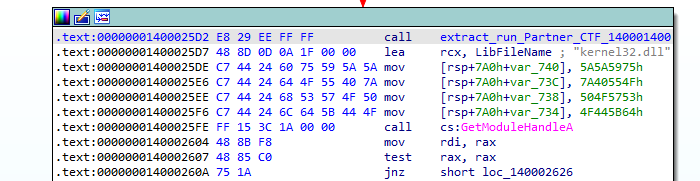
リソースセクションからPEペイロードが抽出され、Partner_CTF.exeとして一時ディレクトリに保存された後、実行される。この処理はサブルーチン0x140001400で行われる。
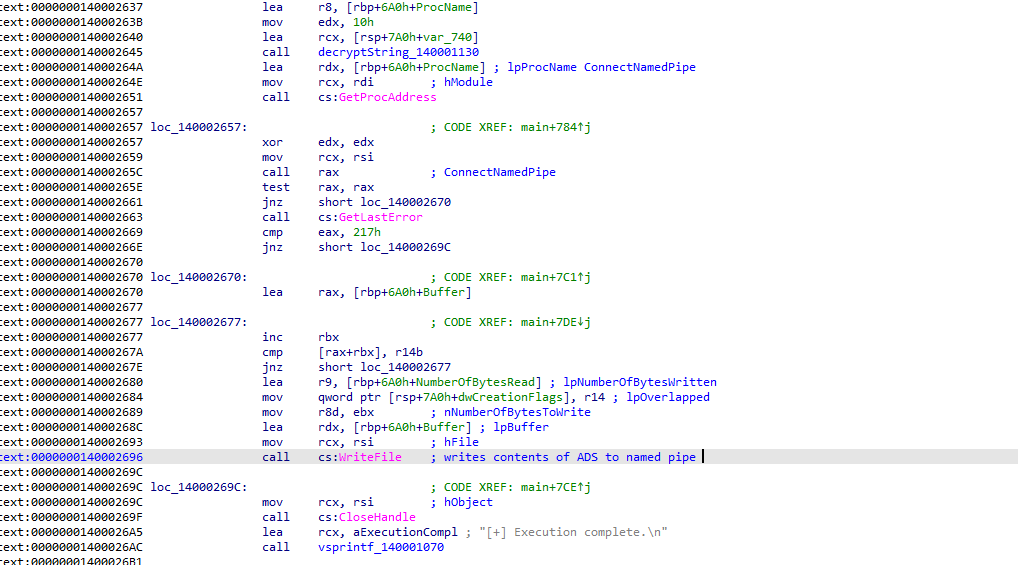
最後にADSのデータ (HarryPotter) を名前付きパイプ (\.\pipe\FlareChallenge) に書き込む。以後の処理はPartner_CTF.exeに引き継がれる。
Partner_CTF.exeの解析
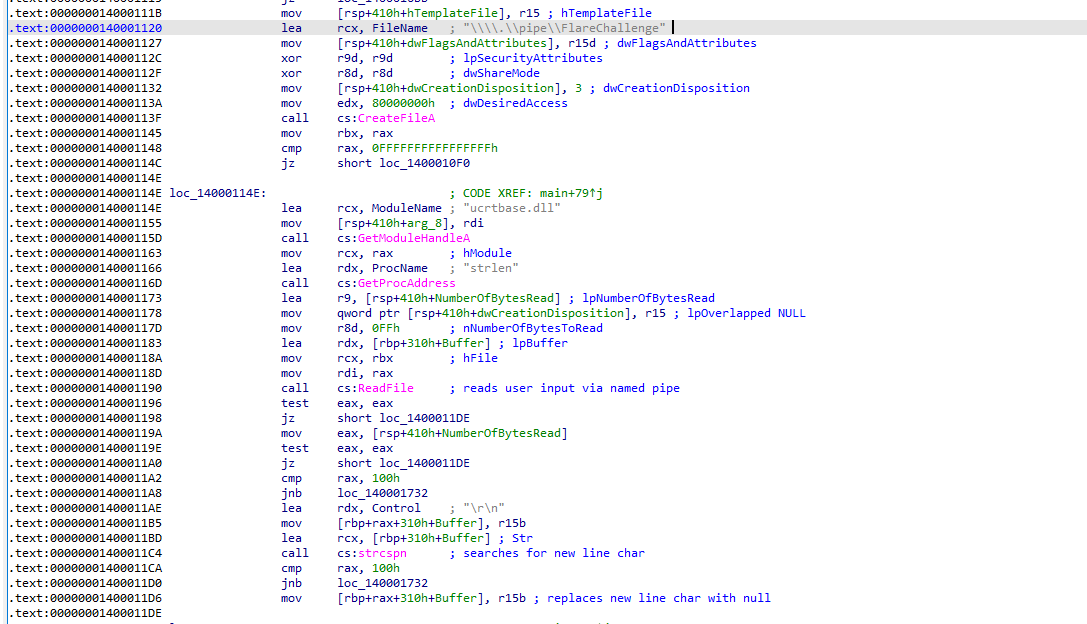
Partner_CTF.exeは、まず名前付きパイプ (\.\pipe\FlareChallenge) からデータを読み込む。そして読み込んだデータから改行コード (\r\n) を検索し、0x00 (Null) に置換する。
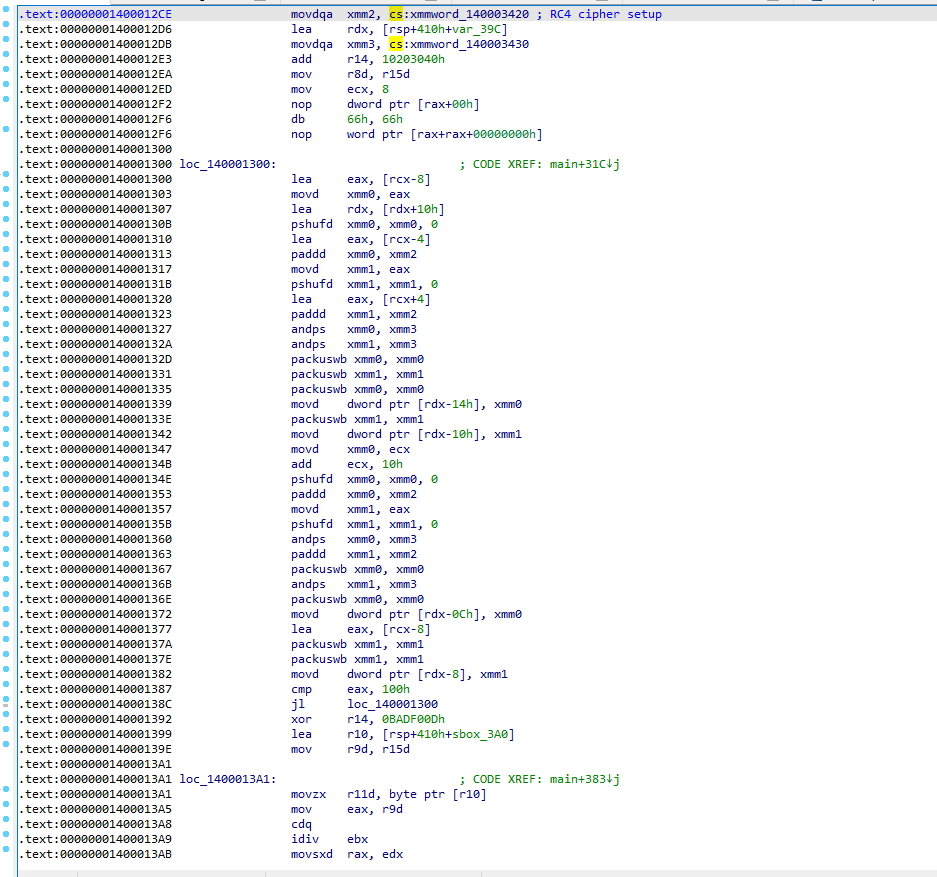
続いて、名前付きパイプから読み込んだ値 (HarryPotter) を鍵にしてRC4のS-boxを生成する (この辺のコードの解析にはAIの力を借りた)。
S-boxの生成が完了すると、VirtualProtectでstrlenのメモリ領域に書き込みできるようにアクセス権を変更し、strlenの先頭23バイトをカスタムのシェルコードに書き換える (この辺のコードの解析にもAIの力を借りた)。

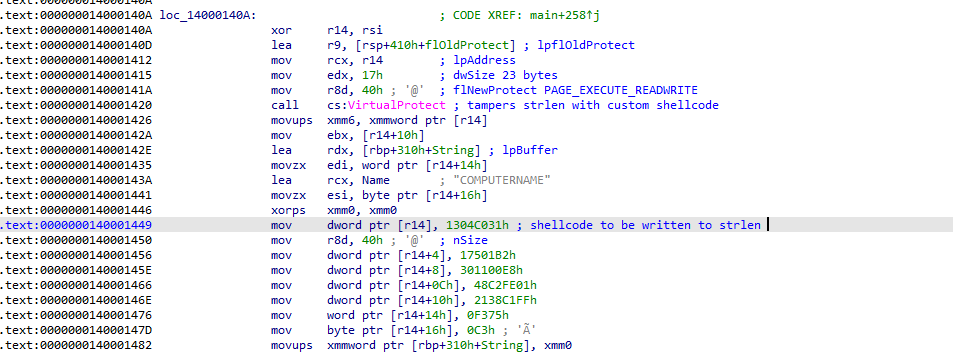
以下はstrlenの先頭23バイトに書き込まれるシェルコード (0x31c00413b2017501e800113001fec248ffc1382175f3c3) である。
$ objdump -b binary -m i386 -M intel -D shellcode.bin

shellcode.bin:     file format binary


Disassembly of section .data:

00000000 <.data>:
   0:   31 c0                   xor    eax,eax
   2:   04 13                   add    al,0x13
   4:   b2 01                   mov    dl,0x1
   6:   75 01                   jne    0x9
   8:   e8 00 11 30 01          call   0x130110d
   d:   fe c2                   inc    dl
   f:   48                      dec    eax
  10:   ff c1                   inc    ecx
  12:   38 21                   cmp    BYTE PTR [ecx],ah
  14:   75 f3                   jne    0x9
16: c3 retデバッガで挙動を見たところ、改ざんされたstrlenは以下のことを行うことが分かった。
- 引数として渡された文字列にカスタムの復号(暗号)処理を施す。
- 戻り値としてEAX (RAX) に
0x13(19) を格納する。
改ざんされたstrlenは2回呼び出される。
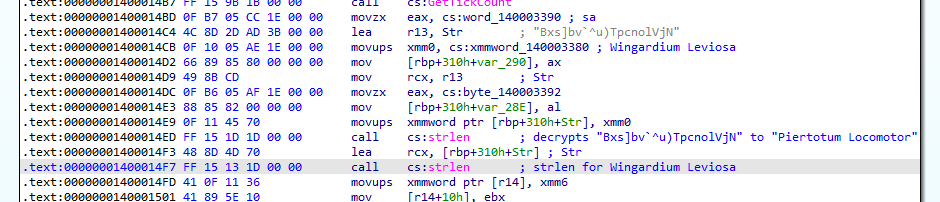
以下は1回目のstrlen実行後の様子である。Bxs]bv`^u)TpcnolVjN という文字列がPiertotum Locomotorに変化した。

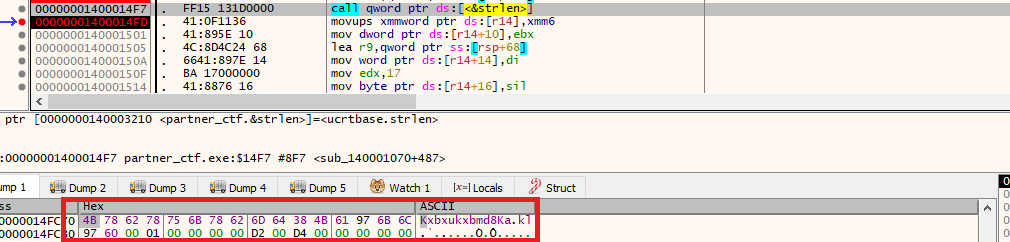
以下は2回目のstrlen実行後の様子である。Wingardium Leviosa という文字列がランダムなバイト (4B 78 62 78 75 6B 78 62 6D 64 38 4B 61 97 6B 6C 97 60) に変化した。
またRAXに0x13 (19) という値が格納されている。
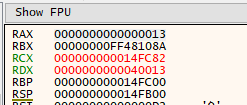
本来 Wingardium Leviosaの文字数は0x12 (18) だが、先述したようにstrlenは渡された文字列に関係なく必ず0x13 (19) を返すように改ざんされている。
復号された文字列 Piertotum Locomotor と2回目のstrlenの戻り値は後にフラグを復号する鍵として利用される。
strlenの呼び出しが完了すると再度VirtualProtectが呼び出され、改ざんされたstrlenを元の状態に戻す。

フラグの復号
残るはフラグの復号処理である。フラグは暗号化された状態でPartner_CTF.exeにハードコードされている。
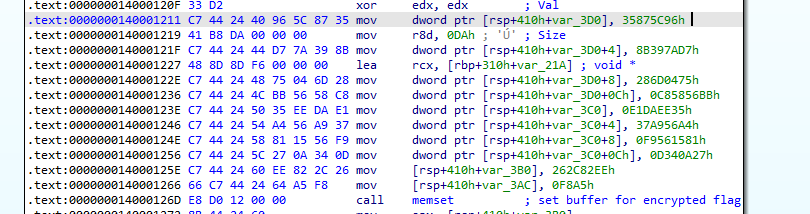
以下は暗号化されたフラグである。フラグのサイズは38バイトであることが分かる。
96 5C 87 35 D7 7A 39 8B 75 04 6D 28 BB 56 58 C8 35 EE DA E1 A4 56 A9 37 81 15 56 F9 27 0A 34 0D EE 82 2C 26 A5 F8復号処理のコードは煩雑なので割愛するが、概ね以下のように行われる。
- 名前付きパイプから読み込んだ値 (
HarryPotter) を鍵にしてRC4のS-boxを生成する。 - 暗号化されたフラグから 1バイト読み出し、改ざんされた
strlenの戻り値と加算 (ADD) する。 Piertotum Locomotorから1バイト読み出し、1. で生成されたS-box (1バイト)とXORを取る。- 2. で求まった値と3. で求まった値のXORを取る。
- 全てのバイトが復号されるまで2~4を繰り返す。
整理すると、
- 暗号化されたフラグ:
96 5C 87 35 D7 7A 39 8B 75 04 6D 28 BB 56 58 C8 35 EE DA E1 A4 56 A9 37 81 15 56 F9 27 0A 34 0D EE 82 2C 26 A5 F8 - 鍵その1:
HarryPotter(S-boxの生成に使用) - 鍵その2:
Piertotum Locomotor - 鍵その3:
18(Wingardium Leviosaの文字数)
フラグの入手
Partner_CTF.exeをデバッガで起動し、メモリやレジスタの値をいじってプログラムにフラグを復号させた。
以下、手順。
事前準備として、名前付きパイプ (\.\pipe\FlareChallenge) を作成しなくてもプログラムの処理が進むように0x1400010E9 のジャンプ命令をJNZからJZ に書き換えておいた。
パッチ前

パッチ後

Partner_CTF.exeをデバッガで起動する。ReadFileのcall直後 (0x140001196) にブレークポイントをセットして、バッファにHarryPotter\x0d\x0aと書き込む (改行コードを忘れずに)。ReadFileの処理が成功したと見なされるよう、RAXの値を1に書き換える (読み込み元の名前付きパイプを作成していないので、そのままだとRAXの値は0となり、処理が失敗してしまう)。0x14000119Eにブレークポイントをセットして、RAXの値を13に書き換える。このRAXの値はReadFileによって読み取られた値を表す。HarryPotter(11バイト) + 改行コード\x0d\x0a(2バイト) で合計13バイトとなる。- 2回目の改ざんされた
strlenのcall直後 (0x1400014FD) にブレークポイントをセットして、RAXの値を18(Wingardium Leviosaの文字数)に書き換える。これをしないと、RAXの値に19がセットされてしまい、フラグを復号できない。 - 復号処理が実行され、フラグが復号される。
上記の手順でフラグを復号できた。
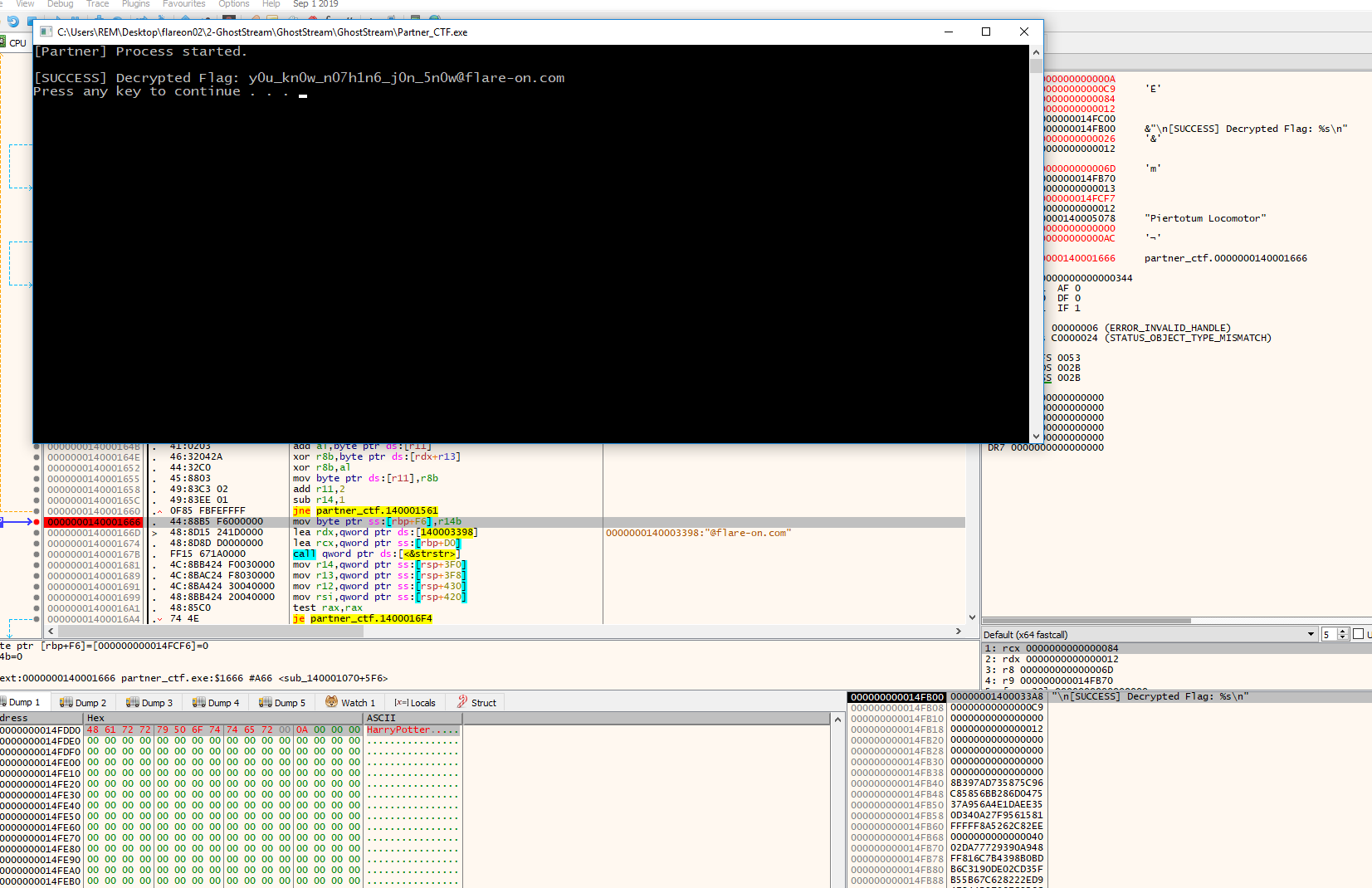
フラグはy0u_kn0w_n07h1n6_j0n_5n0w@flare-on.com。
03 FlareOn13.doc
2問目に苦戦したせいで、3問目はあまり時間をかけられなかった。もっとも、時間が十分に残っていたとしても解けたかどうかは怪しいが。
以下は解析対象のファイル。
$ 7z l 3-flareon13_doc.7z

   Date      Time    Attr         Size   Compressed  Name
------------------- ----- ------------ ------------  ------------------------
2026-08-02 19:04:34 ....A      1855887       130464  flareon13.doc
------------------- ----- ------------ ------------  ------------------------
2026-08-02 19:04:34 1855887 130464 1 filesfileコマンドでflareon13.docを確認してみたが、単なるデータファイルとして認識された。
└─$ file flareon13.doc
flareon13.doc: data続いてbinwalkで調べたところ、PDFやMach-o、ZIPファイルを内包していることが分かった。
└─$ binwalk flareon13.doc
/usr/lib/python3/dist-packages/binwalk/core/magic.py:431: SyntaxWarning: invalid escape sequence '\.'
  self.period = re.compile("\.")

DECIMAL       HEXADECIMAL     DESCRIPTION
--------------------------------------------------------------------------------
132           0x84            PDF document, version: "1.7"
653872        0x9FA30         Mach-O universal binary with 2 architectures
674108        0xA493C         Unix path: /usr/lib/dyld
768348        0xBB95C         Unix path: /usr/lib/dyld
1053768       0x101448        Broadcom 96345 firmware header, header size: 256, board id: "  ", ~CRC32 header checksum: 0x34000000, ~CRC32 data checksum: 0x20202020
1053848       0x101498        Broadcom 96345 firmware header, header size: 256, board id: "  ", ~CRC32 header checksum: 0x1E000000, ~CRC32 data checksum: 0x0
1060008       0x102CA8        Broadcom 96345 firmware header, header size: 256, board id: "  ", ~CRC32 header checksum: 0x20202020, ~CRC32 data checksum: 0x1000000
1095592       0x10B7A8        Broadcom 96345 firmware header, header size: 256, board id: "  ", ~CRC32 header checksum: 0x0, ~CRC32 data checksum: 0x0
1099640       0x10C778        Broadcom 96345 firmware header, header size: 256, board id: "  ", ~CRC32 header checksum: 0x22000000, ~CRC32 data checksum: 0x20000000
1116536       0x110978        Broadcom 96345 firmware header, header size: 256, board id: "  ", ~CRC32 header checksum: 0x20202020, ~CRC32 data checksum: 0x20202020
1131880       0x114568        Broadcom 96345 firmware header, header size: 256, board id: "  ", ~CRC32 header checksum: 0x6000000, ~CRC32 data checksum: 0x3720316E
1855039       0x1C4E3F        Zip archive data, encrypted at least v2.0 to extract, compressed size: 222, uncompressed size: 18, name: flag.txt
binwalk -e flareon13.docでこれらのファイルの抽出を試みたところ、パスワード保護されたZIPファイルと暗号化されたflag.txtが抽出された。
└─$ ll _flareon13.pdf.extracted/
total 16
-rw-rw-r-- 1 kali kali 848 Oct 21 11:07 1C4DBB.zip
-rw-r--r-- 1 kali kali 222 Oct 21 11:07 flag.txt

└─$ file 1C4DBB.zip
1C4DBB.zip: Zip archive data, at least v2.0 to extract, compression method=[0x2]

└─$ file flag.txt
flag.txt: data

└─$ xxd flag.txt
00000000: 12e4 e7d6 af35 f2fa 31dd 5300 8447 6ca7  .....5..1.S..Gl.
00000010: d574 e1bf cfb1 0b15 37a3 454d e5b5 0cc2  .t......7.EM....
00000020: 1c9b 82b4 3c4c af40 8207 30aa 4c3e ca19  ....<L.@..0.L>..
00000030: 2ff8 33f8 2bde 66f5 3244 6efc 5146 894c  /.3.+.f.2Dn.QF.L
00000040: e842 5040 c55a b047 01fe 3107 46ca cc2a  .BP@.Z.G..1.F..*
00000050: e834 10f8 1214 eccd b4e5 abb1 3905 df68  .4..........9..h
00000060: 1e1c 0546 d799 7d94 b147 ece1 7c48 09f9  ...F..}..G..|H..
00000070: 5619 fccf 6a7c 249a da3d 67cc 5a96 33a6  V...j|$..=g.Z.3.
00000080: 941f cbb8 af23 30cb eea7 63fc ae38 f17f  .....#0...c..8..
00000090: 9203 c094 6d16 24c0 00b0 bd1b c2b1 de2d  ....m.$........-
000000a0: 0495 0621 5ed7 b84c 0f60 99c1 0499 ce48  ...!^..L.`.....H
000000b0: 31c7 8e17 1b05 543f 7d3c cd11 d751 38ec  1.....T?}<...Q8.
000000c0: 565d 645e 28cb fb84 655b c907 f073 dc87  V]d^(...e[...s..
000000d0: 4871 829a 1fef cb50 f572 04fa ffba Hq.....P.r....flareon13.docをstringsをかけたところ、ファイルの末尾にconectixやFLAREONPOLYGLOT!などの文字列を見つけたので、これらの文字列をパスワードに指定してみたが、ZIPファイルは解凍できなかった。
└─$ strings flareon13.doc | tail
1854679
%%EOF
flag.txt
T?}<
V]d^(
flag.txtPK
conectix
vpc
Wi2k
FLAREONPOLYGLOT!ちなみにconectixとFLAREONPOLYGLOT!はZIPファイルのコメントに記載されていた。
└─$ exiftool 1C4DBB.zip
ExifTool Version Number         : 12.76
File Name                       : 1C4DBB.zip
Directory                       : .
File Size                       : 848 bytes
File Modification Date/Time     : 2026:10:21 11:07:03-04:00
File Access Date/Time           : 2026:10:25 06:13:44-04:00
File Inode Change Date/Time     : 2026:10:21 11:07:03-04:00
File Permissions                : -rw-rw-r--
Comment                         : conectix..��������vpc .Wi2k.O�.O�5...����FLAREONPOLYGLOT!
File Type                       : ZIP
File Type Extension             : zip
MIME Type                       : application/zip
Zip Required Version            : 20
Zip Bit Flag                    : 0x0001
Zip Compression                 : Reduced with compression factor 1
Zip Modify Date                 : 1980:00:00 00:00:00
Zip CRC                         : 0x25130dea
Zip Compressed Size             : 222
Zip Uncompressed Size           : 18
Zip File Name : flag.txtAIに質問したり、ググっているうちにflareon13.docはPolyglotファイルであるらしいことが分かった。Polyglotファイルとは、1つのファイルが複数の異なるファイル形式やプログラミング言語として同時に正常に認識・解釈されるファイルのことらしい。
先述したbinwalkの解析結果を踏まえると、flareon13.docはドキュメントとしてだけでなく、PDFやMach-oバイナリとしても解釈されると思われる。
Mach-oバイナリを調べれば何かわかるかと思い、抽出してみることにした。
7zコマンドでflareon13.docを調べたところ、flareon13.arm64とflareon13.arm64-3というファイルを発見したので、7z x flareon13.docで抽出してみた。
└─$ 7z l flareon13.doc

   Date      Time    Attr         Size   Compressed  Name
------------------- ----- ------------ ------------  ------------------------
                    .....        68560        68560  flareon13.arm64
                    .....       404512       404512  flareon13.arm64-3
------------------- ----- ------------ ------------  ------------------------
                                473072       473072  2 files
どちらのファイルにもMach-oバイナリのヘッダー (CE FA ED FE) を確認できた。
└─$ file flareon13.arm64
flareon13.arm64: data

└─$ file flareon13.arm64-3
flareon13.arm64-3: data

└─$ xxd flareon13.arm64 | grep -i cffa
00000980: cffa edfe 0c00 0001 0000 0000 0200 0000  ................

└─$ xxd flareon13.arm64-3 | grep -i cffa
00003900: cffa edfe 0c00 0001 0000 0000 0200 0000  ................
Mach-oバイナリのヘッダー以前に大量のランダムなバイトが挿入されていたので、除去したところ、Mach-o バイナリとして認識はされたのだが、逆アセンブルはできなかった。
└─$ file flareon13.arm64_curved
flareon13.arm64_curved: Mach-O 64-bit arm64 executable, flags:<NOUNDEFS|DYLDLINK|TWOLEVEL|PIE|HAS_TLV_DESCRIPTORS>

└─$ file flareon13.arm64-3_curved
flareon13.arm64-3_curved: Mach-O 64-bit arm64 executable, flags:<NOUNDEFS|DYLDLINK|TWOLEVEL|PIE|HAS_TLV_DESCRIPTORS>
AIに質問したところ、どうやらファイルのオフセットを修正する必要があるらしい。
オフセットを修正するスクリプトをAIに生成してもらった。
import struct
import sys

# Mach-O Load Command constants
LC_SEGMENT_64 = 0x19

def fix_macho_offsets(input_path, shift_amount, output_path):
    with open(input_path, 'rb') as f:
        data = bytearray(f.read())

    # Check for 64-bit Mach-O magic bytes (0xFEEDFACF in little-endian)
    magic = struct.unpack('<I', data[0:4])[0]
    if magic != 0xFEEDFACF:
        print("[-] Error: Magic bytes 0xFEEDFACF not found at offset 0 of the carved file!")
        print("    Make sure you carved starting exactly at the CF FA ED FE header.")
        return

    # Parse Mach-O Header
    ncmds, sizeofcmds = struct.unpack('<II', data[16:24])
    print(f"[+] Mach-O header found: {ncmds} load commands.")

    offset = 32  # Load commands start right after the 32-byte header (64-bit)

    for i in range(ncmds):
        cmd, cmdsize = struct.unpack('<II', data[offset:offset+8])

        if cmd == LC_SEGMENT_64:
            # LC_SEGMENT_64 structure: fileoff is at offset + 40 from the command start
            fileoff_idx = offset + 40
            fileoff = struct.unpack('<Q', data[fileoff_idx:fileoff_idx+8])[0]

            if fileoff >= shift_amount:
                new_fileoff = fileoff - shift_amount
                data[fileoff_idx:fileoff_idx+8] = struct.pack('<Q', new_fileoff)
                segname = data[offset+8:offset+24].decode('ascii', errors='ignore').rstrip('\x00')
                print(f"[+] Adjusted segment '{segname}': fileoff 0x{fileoff:X} -> 0x{new_fileoff:X}")

        offset += cmdsize

    with open(output_path, 'wb') as f:
        f.write(data)

    print(f"\n[+] Saved patched binary to: {output_path}")

if __name__ == '__main__':
    if len(sys.argv) < 3:
        print("Usage: python fix_macho_offsets.py <carved_binary> <carve_offset_hex> [output_file]")
        print("Example: python fix_macho_offsets.py carved.bin 0x1000 fixed_macho.bin")
        sys.exit(1)

    input_file = sys.argv[1]
    carve_offset = int(sys.argv[2], 0) # Safely converts hex strings like 0x1000 to int
    output_file = sys.argv[3] if len(sys.argv) > 3 else "fixed_" + input_file

    fix_macho_offsets(input_file, carve_offset, output_file)
元のファイルのMach-o ヘッダー (CF FA ED FE) のオフセット (0x00003900) を引数に渡してスクリプトを実行したところ、オフセットが修正されたfixed_macho.binが作成された。
└─$ xxd flareon13.arm64-3 | grep -i cffa
00003900: cffa edfe 0c00 0001 0000 0000 0200 0000  ................

└─$ python fix_macho_offsets.py flareon13.arm64-3_curved 0x00003900 fixed_macho.bin
[+] Mach-O header found: 18 load commands.
[+] Adjusted segment '__DATA_CONST': fileoff 0x54000 -> 0x50700
[+] Adjusted segment '__DATA': fileoff 0x58000 -> 0x54700
[+] Adjusted segment '__LINKEDIT': fileoff 0x5C000 -> 0x58700

[+] Saved patched binary to: fixed_macho.bin

└─$ file fixed_macho.bin
fixed_macho.bin: Mach-O 64-bit arm64 executable, flags:<NOUNDEFS|DYLDLINK|TWOLEVEL|PIE|HAS_TLV_DESCRIPTORS>fixed_macho.binをGhidraで開いたところ、無事 Mach-oバイナリとして認識され、逆アセンブルできた (自分は普段はIDA派なのだが、フリー版はMach-oバイナリをサポートしていない)。
逆アセンブルできて喜んだのも束の間、大量のサブルーチンに愕然とした (スクリーンショットしたものは氷山の一角)。
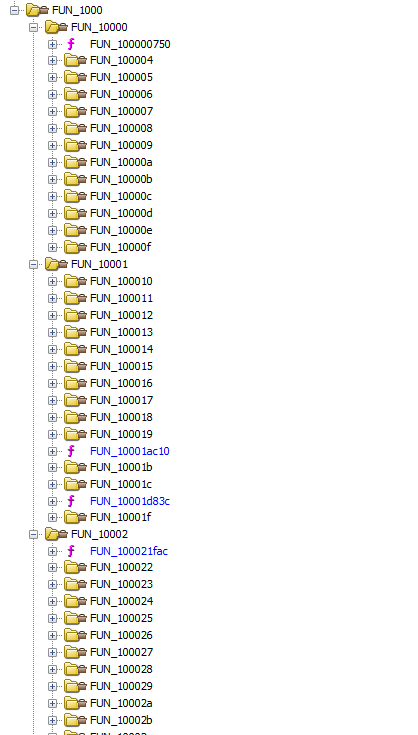
サブルーチンをいくつか確認してみたが、恐らくそのほとんどは妨害目的の囮コードと思われた。
この時点ですでに金曜の夜、CTF終了まで約8時間。徹夜して取り組む気力は湧かなかったので、今年のチャレンジはここで終了とした。
